
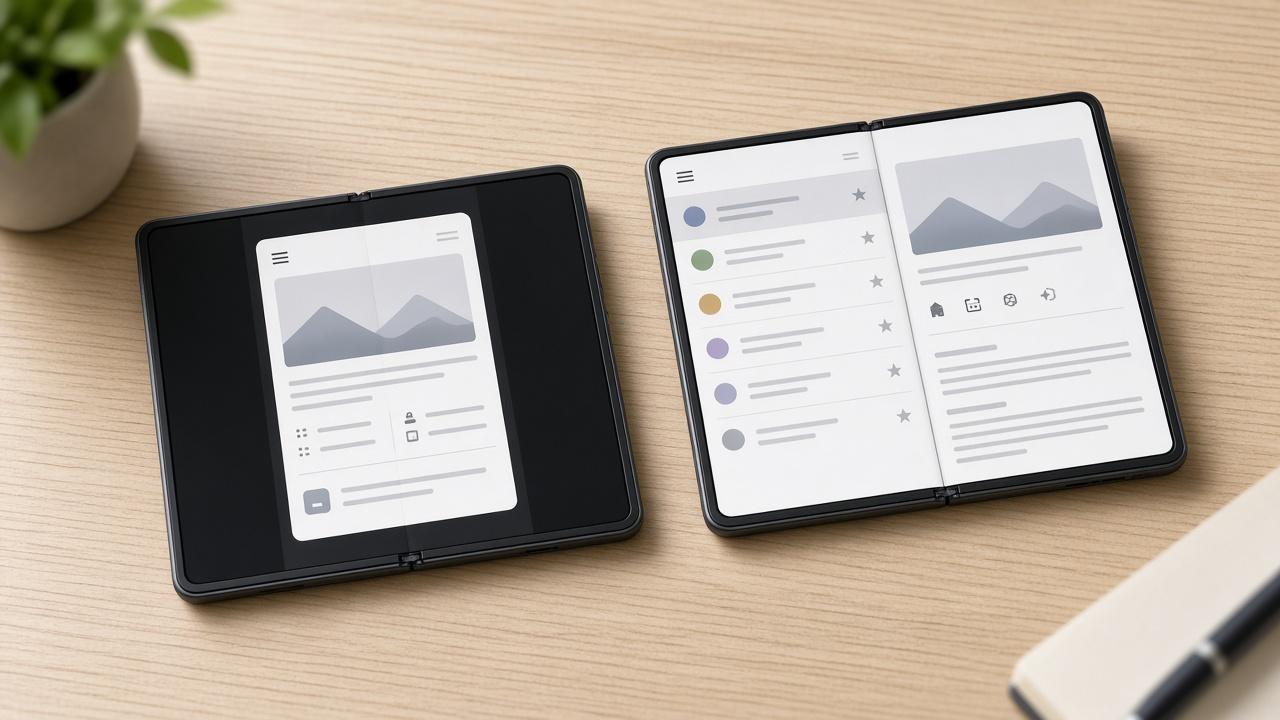
Foldables on Google Play: What becomes mandatory in April 2027 and how to check your app
Unfold a foldable, open an app and look at the edges. Many apps leave a black bar on the left and right and sit in the middle as a narrow phone-sized strip. Rotate the device, and the half-filled form is empty again.
On 18 November 2026, Google Play announced that this will no longer be enough. From April 2027, new apps and updates must meet a minimum quality level on foldables, and foldable screenshots become mandatory in the store listing.
The good news: the minimum is not a design project, it is mostly careful engineering. The less good news: you usually only find the gaps when you look for them on purpose.
What exactly changes?
Google names two requirements that apply from April 2027:
- Minimum quality on foldables: apps must meet at least the lowest level of Google's guidelines for adaptive apps. Google calls it “Tier 3” or “Adaptive ready”.
- Foldable screenshots: if you submit a new app or update your store listing, you need 3 foldable screenshots in addition to the standard 2 phone screenshots.
The next step follows in August 2027: new apps and updates must then target Android 17 (API level 37). According to Google, this removes the options apps used to lock their orientation or block window resizing on large screens.
What does “Tier 3” mean in plain words?
Google splits its quality guidelines into three levels. “Tier 3” is the baseline. “Tier 2” and “Tier 1” are the higher levels, which can earn a badge and more visibility in the store. For the baseline, an app mainly needs to:
- Use the whole screen (or the whole window in split screen). No black bars, no compatibility mode, nothing spilling over the edge.
- Lose nothing when the screen changes: when rotating, folding, unfolding or resizing the window. The scroll position stays, typed text stays, a video continues where it was. Several changes in a row must work too.
- Work fully in split screen: the app keeps running when another app is in front, and hands camera and microphone back and forth cleanly.
- Show camera preview and screen sharing the right way up and undistorted in every position.
- Support keyboard, mouse, trackpad and stylus at a basic level: typing, clicking, selecting, scrolling. Android already handles much of this on its own.
What “Tier 3” does not ask for: a dedicated layout for large screens, such as list and details side by side. That belongs to “Tier 2”. For the baseline, the app may not look ideal on a large display yet, as long as people can get everything important done.
Who is affected?
According to Google, the requirement applies to standard apps on Google Play. Games have their own large-screen requirements.
This is not only about people who own a foldable. Google counts more than 580 million large-screen devices, including tablets and laptops. And the same situations happen on every phone: rotating, split screen, a keyboard on a tablet. If your app loses input there today, the problem did not start with foldables.
What happens if you miss the deadline?
According to Google, apps that do not meet the baseline will no longer be able to publish or update on Google Play and may be less visible in the store. Existing versions that are not updated stay downloadable.
That sounds harmless at first. But when a bug suddenly needs an urgent fix, it is a hurdle you really do not want at that moment.
How to check your app in half an hour
This does not replace a full test, but it gives you an honest first impression. Google recommends the “Foldable (1:1 inner display)” and “Foldable (4:3 inner display)” emulators in Android Studio. A real device works too, of course.
- Fill in half a form, then rotate, fold and unfold. Is the text still there?
- Scroll down a long list, then rotate. Are you still in the same place?
- Start a video, then fold or unfold. Does it continue where it was?
- Open the app in split screen and resize the window. Does it use the space, or stay a narrow strip with black bars?
- Play a video and tap a second app. Does the video keep playing?
- Connect a keyboard and mouse. Can you type, click and scroll?
Google explicitly tests combinations too, for example shrinking the window first and then rotating. That is where it sometimes gets tricky, because each step works on its own but the sequence does not.
You can already upload foldable screenshots in Play Console (Grow > Store presence > Store listings). According to Google, screenshots from the two foldable emulators meet the new requirements.
How much effort is it?
Honestly, it depends a lot on the app. A serious number is only possible after looking at the code and the most important flows. A few pointers:
- Usually less if the app is built with modern tools such as Jetpack Compose and saves its state properly. Then it is often mostly testing and screenshots.
- Usually more if the app is locked to portrait or has window resizing switched off. Once you lift that lock, screens often appear that were never meant for wide displays.
- Often underestimated: keeping state in forms, videos and lists. You rarely notice it day to day, because hardly anyone rotates their phone halfway through a form.
- For cross-platform apps (such as React Native or Flutter) often somewhat more, but not automatically: these apps usually handle rotating and unfolding well, because the React Native and Flutter templates catch it without restarting the screen. The extra work tends to sit elsewhere: many of these apps are locked to portrait (the default Expo template, for example). Third-party add-ons for camera, video or image picking don't always cope with changing screen sizes (examples from the React Native community). There are fewer ready-made building blocks for large screens than in Google's own toolkit, Jetpack Compose. And moving to Android 17 here often also means updating React Native or Flutter itself and many add-ons.
More important than an exact estimate is the timing. April is a little over four months away. If you check now, you can plan the fixes into regular updates instead of doing everything at once just before the deadline.
What we take from it
At Ahoi Kapptn! we prefer to tackle requirements like this early and step by step: check once, sort, plan into regular updates. Devices change faster than any plan, and an app is rarely truly finished. What matters is seeing gaps early and being able to react fast.
And “Tier 3” is only the start. Google says it will gradually require the higher levels too, including for tablets, laptops and XR glasses.