.svg)
AI that works without the cloud.
An AI assistant that runs entirely on your own hardware: no cloud service, no external API calls, no data leaving your company network.
- Fully on-premise
- Your data never leaves your network
- No per-user licence fees
Local AI in one minute
From the problem to the assistant to the agents: this is how Local AI works inside your company network.
Cloud AI is not an option for you. Rightly so.
Many manufacturers have blocked ChatGPT and the like. Not out of fear of technology, but for sound reasons.
The data leaves the building.
Every request to a cloud service sends content to servers outside your company, often outside the EU. For design data, quotes or HR matters, that rules it out.
IT policy says no.
Internal IT security, data protection, confidentiality towards customers: that is why many companies explicitly prohibit public AI services. Using them anyway breaks your own rules.
Nobody can check what happens to the input.
Retention, use for training, subcontractors: the provider sets the terms and can change them. Your IT can neither control nor audit any of it.
- The result
No AI at all.
Your knowledge sits in service reports, machine documentation and the heads of experienced staff who will soon retire. So far there is no permitted way to put it to work with AI.
How it works
Four building blocks, all running inside your network. None of it is a black box, and you can inspect all of it on site.
Your employees
Web chat in the browser, at the desk or on a tablet on the shop floor.
AI workstation
- Language model
- Search index over your documents
- Agents
- Connectors
Your systems
- File server & DMS
- Service reports
- ERP
- Document workflows
Cloud AI services and external APIs: no connection, no data going out.
- 01 · Hardware
An AI workstation in your server room
A compact, powerful system runs the language models. You buy it once, it sits on your premises and belongs to you. We set the performance class in the concept, to match your use cases.
- 02 · Models
Language models that run on your premises
The language model lives entirely on your workstation and computes there. No request goes to an external service. When a better model comes out, we swap it in, without a new contract.
- 03 · Knowledge
Search across your own documents
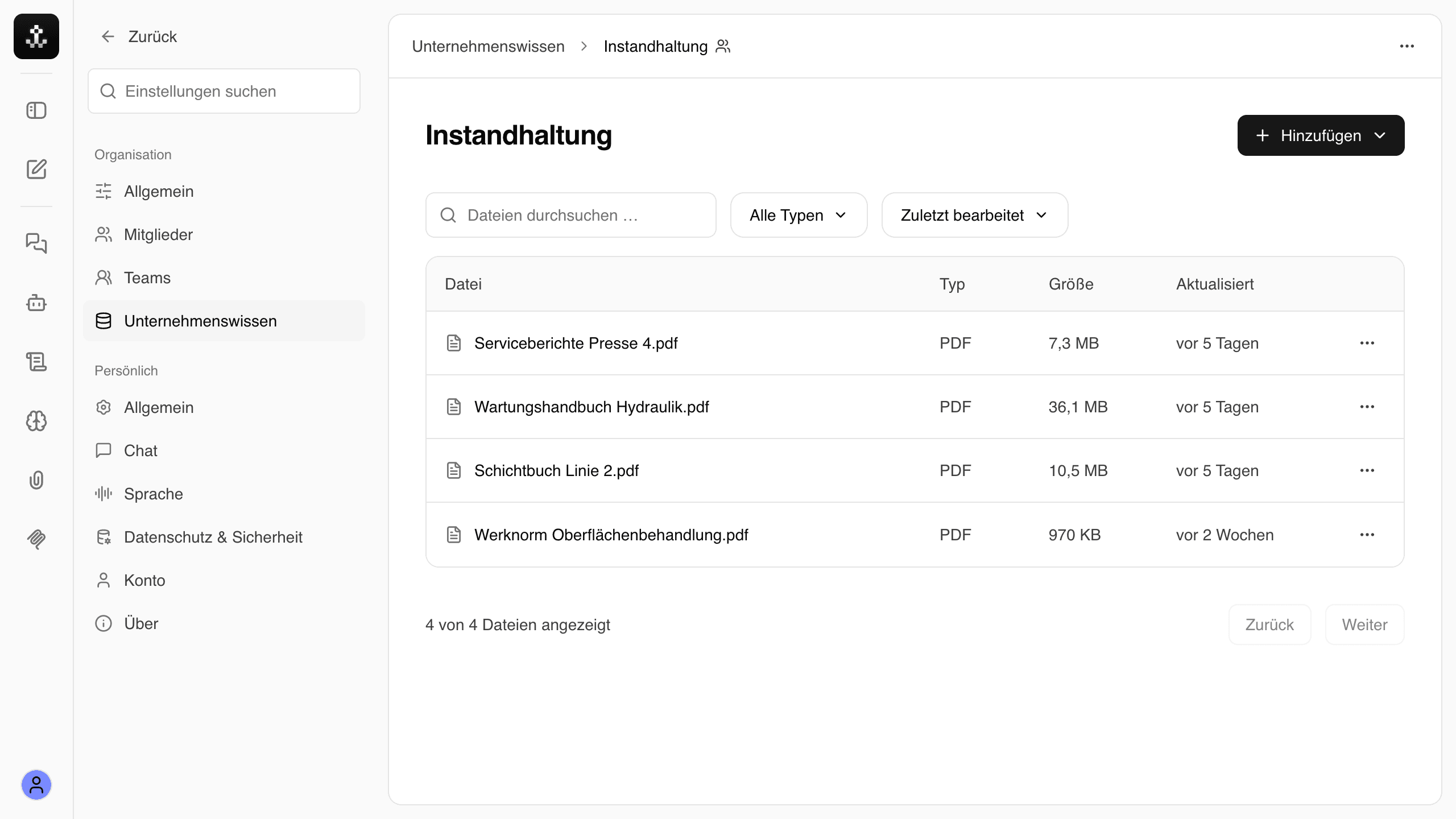
Manuals, service reports and process descriptions are made searchable, and the search index lives on your hardware. The assistant names its sources for every answer and says openly when your documents hold no answer. You decide which team sees which folders through shares.
- 04 · Integration
Web chat and connectors
Your employees work in the browser, with nothing to install. Through connectors the assistant reads data from existing systems such as ERP or document workflows. Which interfaces exist and what may be read, we settle in the workshop.
Built for data that falls under the GDPR
As soon as personal data is involved, cloud AI gets complicated. With Local AI the hardest questions fall away, because no AI provider is involved.
Data transfer
Cloud AIThe data goes to the provider's data centres, often outside the EU. You need a legal basis for that.
Local AIThe data stays inside your company network. Nothing is transferred to an AI provider.
Data processing
Cloud AIThe AI provider becomes a data processor, with a contract, audits and its own subcontractors.
Local AINo external AI service processes your data, so there is no additional processor for it.
Storage and deletion
Cloud AIHow long input is kept and what it is used for is decided by the provider.
Local AIYou control storage, access and deletion yourself, on your own hardware.
Data that used to be off limits
The most knowledge often sits exactly where personal data is. With Local AI you can put it to use.
- Human resources
Personnel files, contracts, works agreements
Which rule applies to shift work, what the employment contract says, which training is missing: questions that touch personal data, without it leaving the building.
- Customers and sales
Correspondence, quotes, contacts
Search earlier quotes and customer correspondence, including names and contact details that should never end up in a cloud service.
- Quality and complaints
Complaints and inspection reports
Complaints with customer names, inspection reports with signatures, actions with named owners: ready to analyse without anonymising them first.
- Specially protectedOccupational safety
Accident reports and safety briefings
Accident reports contain health data, which the GDPR specially protects. Exactly this kind of document belongs on your own hardware.
What you can use it for
Four typical situations from production, service and purchasing. The examples are illustrative, the way it works is real.
- Technician assistance
The service technician asks before reaching for the wrench.
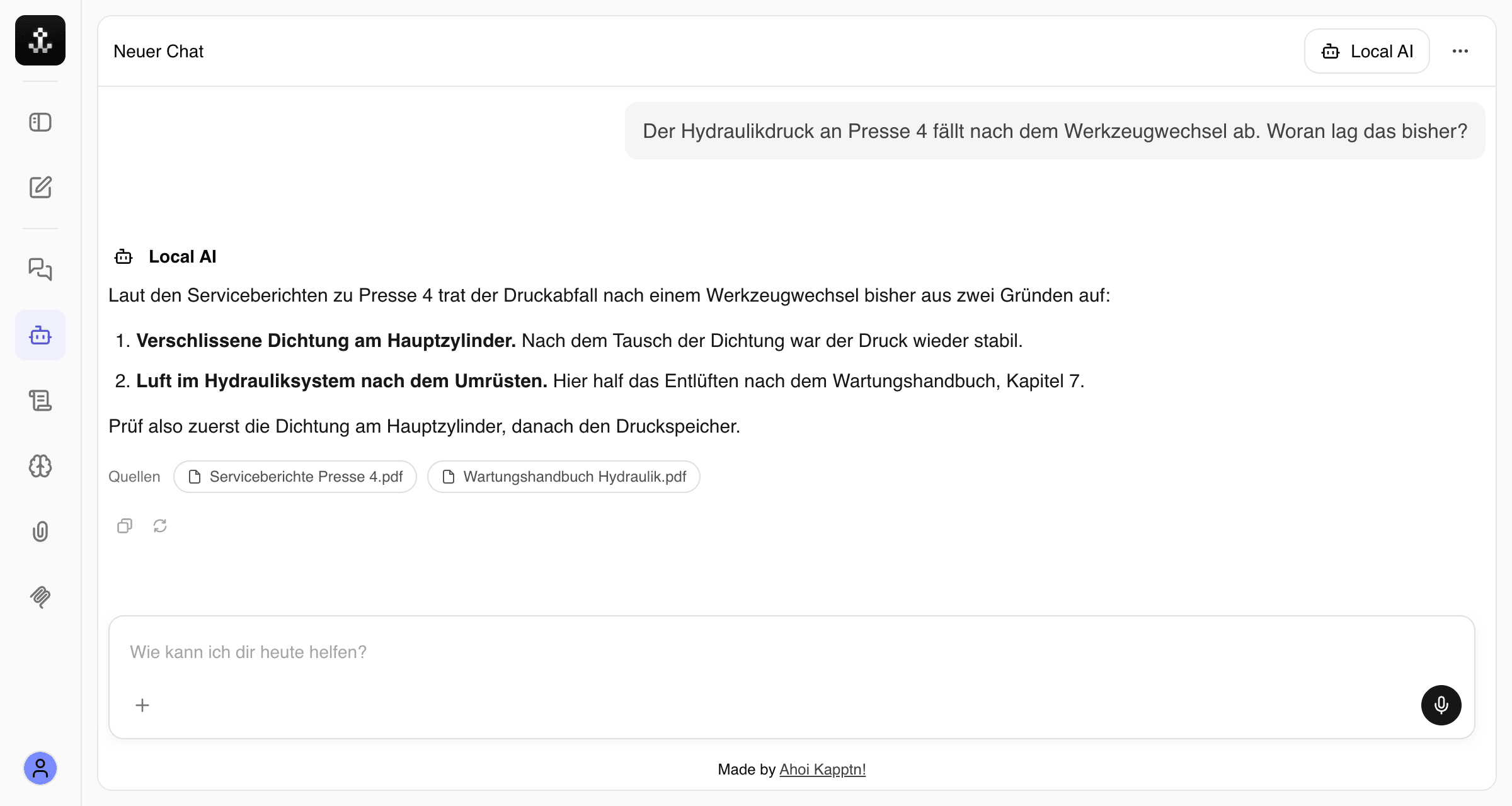
A machine shows a fault the technician on site has never seen. Instead of searching three binders and the ticket system, he asks on his tablet.
Question:
„The hydraulic pressure on press 4 drops after a tool change. What caused this before?“
Answer: The assistant summarises earlier service reports on this fault and links the passages it took the answer from.
- Service reports
- Maintenance manual
- Knowledge retention
The knowledge stays when a colleague retires.
A maintenance technician with decades of experience retires soon. His notes, shift log entries and handover records become part of the knowledge base.
Question:
„What do I need to watch for when restarting the line after the plant shutdown?“
Answer: The answer draws on his records, even after he has left the company.
- Shift log
- Handover records
- Document processing
The customer's specification, checked against your standards.
A request comes with an extensive specification. The assistant compares the requirements with your internal company standards.
Question:
„Which requirements in this specification deviate from our company standard for surface treatment?“
Answer: A list of deviations with a reference to the page for each. Groundwork for the specialist department, not a replacement for it.
- Specification (upload)
- Company standards
- ERP data queries
Query ERP data without building a report.
The head of purchasing quickly needs an overview for which the ERP has no ready-made report.
Question:
„Which open orders with supplier X have a delivery date after the end of the month?“
Answer: The assistant reads the data from the ERP through a read-only connector and returns a table to work with.
- ERP: orders
Not just answers: agents that get tasks done
An agent is an assistant with a fixed job. It uses the tools you allow it and works through a task step by step. Just as local as everything else.
Set up without programming
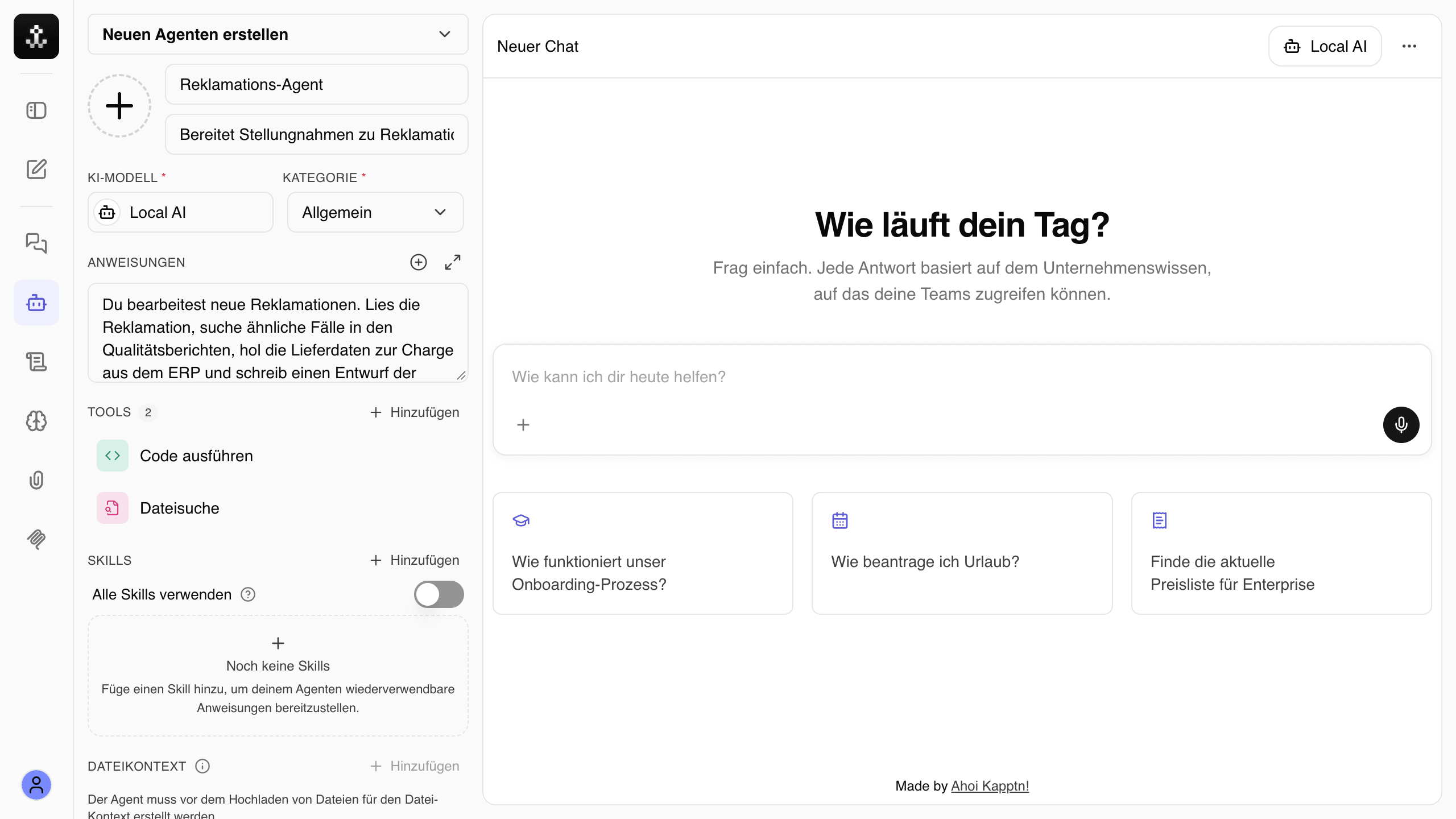
Define instructions, the right documents and permitted tools in one form. The result is an agent for exactly one task.
Only the tools you allow
Document search, spreadsheet analysis, connectors to ERP and DMS: an agent can only do what you permit.
Every step traceable
You see which steps the agent took and which sources it used before you accept the result.
Share with the team, run on a schedule
A good agent is available to the whole team. Recurring tasks run at fixed times.
Example agents
Complaints agent
Reads new complaints, finds similar cases and prepares the response.
Quotation agent
Puts together a draft quote from the enquiry, earlier quotes and price lists.
Onboarding agent
Answers new colleagues’ questions about processes, policies and contacts.
Weekly report agent
Every Monday, summarises last week’s faults and maintenance from the shift logs.
What it costs, and how you get there
You invest in hardware once and pay for our work. There are no recurring licence fees per user or per token.
- 01
Use case workshop
Together with IT and the specialist departments we work out where AI really helps you, which data sources exist and what your IT policies require.
- 02
Concept
Architecture, hardware sizing, connectors and permissions. Afterwards you know what you are buying and why.
- 03
Hardware setup & training
We set up the workstation on your premises, connect the first data sources and train your employees.
- 04
Ongoing support
Updates, new models, further data sources and use cases. We operate what we have built.
The cost model
- Hardware
Bought once
You pay for the workstation once. It sits in your server room and belongs to you.
- Licences
No recurring fees
No costs per user, per request or per token. Not even when more people join in.
- Our services
A quote for your case
Workshop, concept, setup and support: after the workshop you get a concrete quote, not a price list.
Why Ahoi Kapptn!
We are a software company from Linz. We build digital products end to end and take care of running them afterwards.
Everything from one team
Workshop, concept, software, hardware setup and support. You have one point of contact, not five vendors passing responsibility back and forth.
We operate what we build
We don't disappear after go-live. We take care of updates, model changes and new data sources, just as with the other products we operate.
From Linz, since 2016
We are based in Upper Austria, come to your site and have been building digital products since 2016, from the first idea to day-to-day operation.
Asked often, answered once
The key answers on privacy, features and operations. Your question isn’t here? We’ll answer it in the initial call.
Ask a questionPrivacy & security
Is Local AI GDPR compliant?
Compliance is never a property of a tool alone, it is always about how it is used. But Local AI takes the hardest points off your plate: no transfer to an AI provider, no external AI service as a data processor, storage and deletion in your hands. The concept from the workshop describes which data sits where, a solid basis for your data protection officer.
Is our data used to train third-party models?
No. Your documents, questions and answers do not leave your company network and go to no provider. There is nobody outside who could store, analyse or reuse them.
Does the system need an internet connection?
Not for operation. Requests, documents and answers stay inside your company network. How updates and new models reach the workstation, we agree together with your IT.
Who sees which documents?
You decide through team shares which folders are searchable for whom. Which permissions are carried over from your existing systems, we settle in the concept.
Assistant & agents
What is the difference between an assistant and an agent?
The assistant answers questions. An agent is given a task and completes it in several steps, for example searching, analysing and writing a draft. You decide which tools it may use.
Are local models good enough?
For working with your own documents and data, in many cases yes. In some disciplines the largest cloud models are stronger. That is why we check in the workshop, using your documents, what is realistic before you buy hardware.
What if the assistant says something wrong?
That can happen, as with any AI. That is why the assistant names the documents behind every answer, so you can check. And when your documents hold no answer, it says so instead of making something up.
Which documents can the assistant read?
Common formats such as PDF, Word, Excel, PowerPoint and text files. Which sources we connect, from the file server to document management, and in which order, we settle in the workshop.
Which languages does it work in?
The assistant answers in the language you ask in. A German question about an English manual gets a German answer.
Rollout & operations
What do we need in our IT?
A spot in the server room with power and a network connection. Your employees only need a browser, nothing is installed on their machines. We agree the details with your IT in the concept.
Can we start small?
Yes, and we recommend it. We start with the use case from the workshop that brings the most value. More data sources and departments follow once the first case works in everyday use.
What happens when a better model comes out?
The language model can be swapped. We test new models and bring them in as part of our support when they are better for your use cases. No new contract and no new licence.
Who takes care of maintenance and updates?
We do. Ongoing support covers updates, model changes and new data sources. Your IT does not have to learn how to run an AI system.
Cast off: start with a workshop.
Tell us briefly where you want to use AI and what your IT policy says about it. We will get back to you personally and work out in a first call whether a workshop makes sense for you.
Phone
+43 677 612 791 77